Halo Live
Google authentication
Log in
Keep me logged in
No verification in 7 days
Or
Log in with Lark
Show Key
Please enter the verification code
Verify
To ensure the security of the agency panel, we require agents to use Google Authenticator for verification. Please follow the process to log in to your panel.
Step 1: download Google Authenticator
iOS link: https://apps.apple.com/app/google-authenticator/id388497605
Android link: https://play.google.com/store/apps/details?id=com.google.android.apps.authenticator2
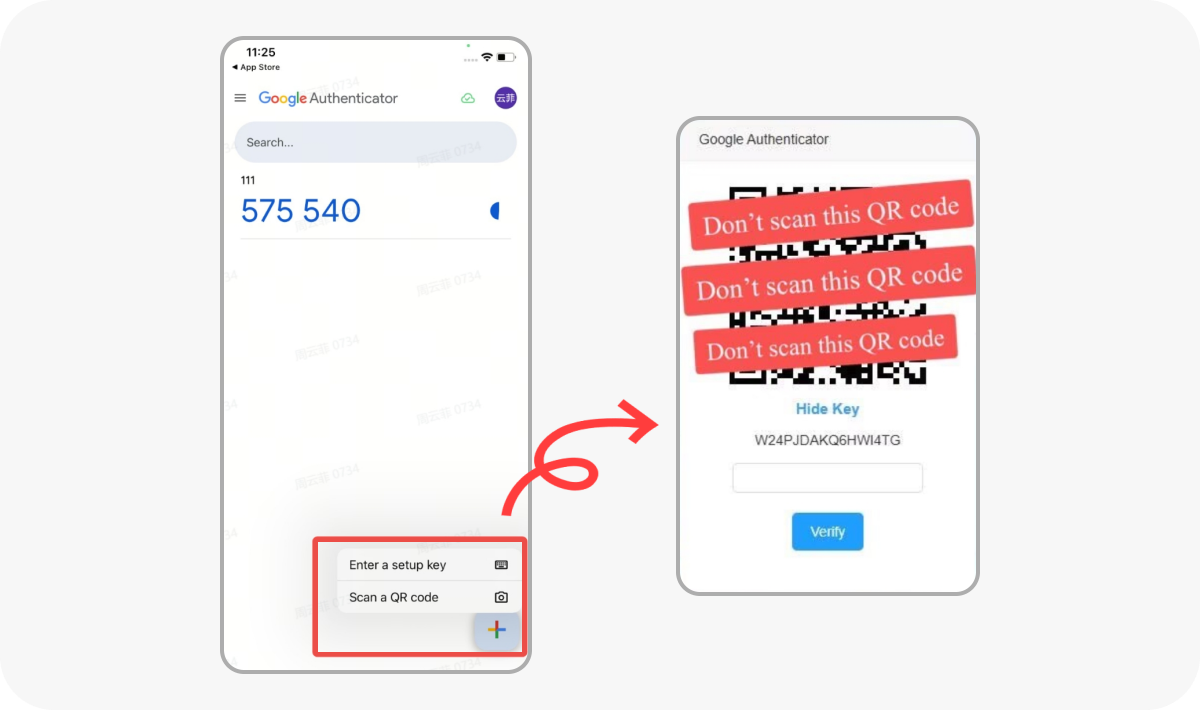
Step 2: Tap the "+" button and select "Scan a QR code."
Scan the QR code displayed in the agency panel.
Enter the 6-digit verification code to log in.
 Step 1: download Google Authenticator
 Step 2: Tap the "+" button and select "Scan a QR code."